Emporia Vue Gen 2 Review
4.0out of 5
Typical price
$150–$200
Best for
Budget buyers who find the 16-sensor kit on sale and want real per-circuit numbers.

Check Price on Amazon

Discontinued: Emporia replaced the Vue Gen 2 with the Emporia Vue 3. For an in-stock pick, see the Emporia Vue 3 or the other Energy Monitors we review.
Jump to verdict

Watch a Video Review

Key Takeaways

  • Best for: per-circuit numbers with no monthly fee, at a discount
  • Standout: 1-second data on up to 16 circuits plus both mains
  • Watch out: Wi-Fi only, and the install can be fiddly
  • Not for: new buyers who can get the Vue 3 for about the same price

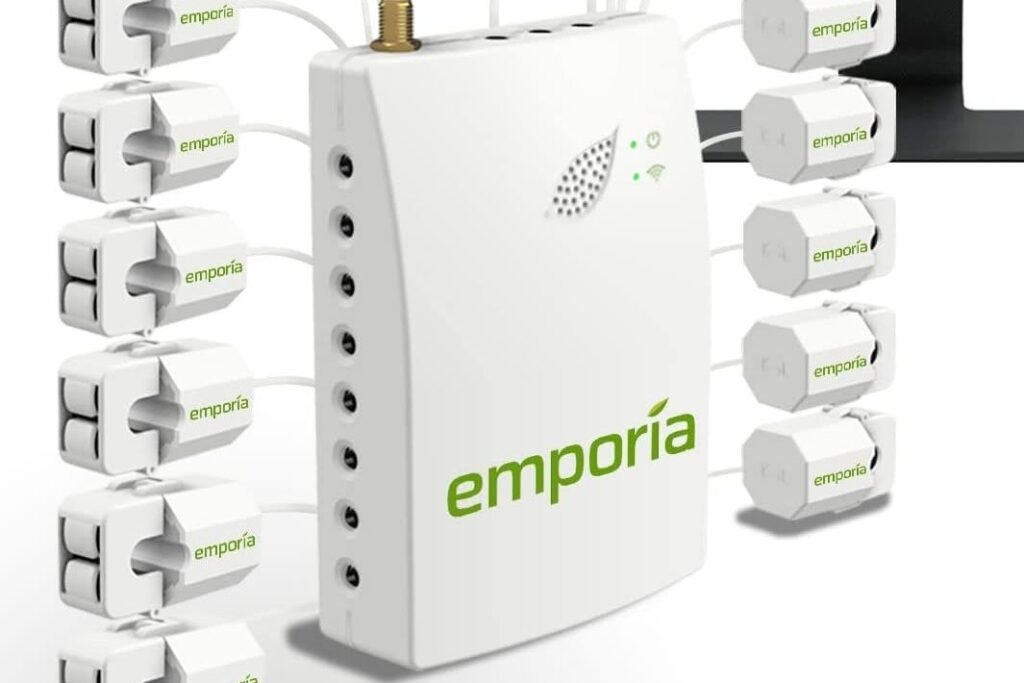
The Emporia Vue Gen 2 is the earlier version of Emporia’s in-panel monitor: it tracks your whole home and up to 16 individual circuits in a phone app, with no subscription. The 16-sensor kit typically sold for $150 to $200.

What you can track

Put the clamps on the loads that move your bill, like HVAC, water heater, dryer and EV charger. Circuits without a clamp only show up in the whole-home total. The app then keeps:

  • Live use: 1-second readings, kept for 3 hours
  • Recent detail: 1-minute data, kept for 7 days
  • Long-term trends: hourly data, kept indefinitely and exportable
  • Costs: enter your utility rate to see dollars, not just kWh
  • Solar: production and net metering

Installation

The monitor sits inside your breaker panel and takes power from its own 15A or 20A breaker. The 200A mains clamps are about 2.6 inches across, so check that your panel has room around the service wires. The Wi-Fi antenna mounts outside the panel through a knockout. Emporia says to have a licensed electrician do it, following local code.

How it compares

Emporia Vue Gen 2 Emporia Vue 3 Fusion Energy SEM-Meter
Typical price $150 to $200 $100 to $200 $135 to $150
Circuit sensors 16 x 50A Up to 16 x 50A 16 x 50A
Mains sensors 2 x 200A 2 x 200A Included
Local, no-cloud mode No, cloud app No, cloud app Yes: MQTT for Home Assistant
Connection 2.4GHz Wi-Fi Wi-Fi or Ethernet 2.4GHz Wi-Fi
Warranty 1 year 1 year 1 year
Best for Existing owners, or a deep discount New buyers wanting Ethernet Tightest budget, local Home Assistant data

See my Emporia Vue 3 and Fusion Energy SEM-Meter reviews.

Want to see other Energy Monitors? Compare them side by side →

How I researched this: Emporia’s Gen 2 specs and FAQ, a retailer spec sheet, Android Headlines’ hands-on review by an electrician, and Smart Home Explorer’s review roundup. Prices checked September 29, 2026.

Emporia Vue Gen 2

Emporia Vue Gen 2 review: 16 circuit sensors, 1-second data and no subscription. What it tracks, installation tips, and how it compares with the Vue 3.

Product Brand: Emporia

Editor's Rating:
4

Pros

  • Circuit-level detail on up to 16 circuits plus both mains
  • Rated ±2% accuracy
  • Detailed app history, down to 1-second readings
  • UL listed
  • No subscription

Cons

  • Wi-Fi only (2.4GHz), with no Ethernet option
  • Only a 1-year warranty
  • Bulky clamps and loose connector plugs made the install slow, even for an electrician (Android Headlines)
  • Replaced by the Vue 3, which adds Ethernet for about the same price

Specs

Circuit sensorsUp to 16 x 50A
Mains sensors2 x 200A
AccuracyRated ±2%
Data interval1 second
Connectivity2.4GHz Wi-Fi with external antenna
Electrical systemsSingle-phase, split-phase 120/240V, three-phase up to 415Y/240V (no Delta)
CertificationUL listed
Size4.1 x 3.1 x 1.1 in
Warranty1 year

Verdict

Still a capable circuit monitor if you already own one or find the 16-sensor kit well under $150. New buyers should pay the similar price for the Vue 3, which adds wired Ethernet.

Emporia Vue Gen 2$150–$200 typical price
Check Price on Amazon
Share this review Facebook Pinterest

Common Questions

Can I monitor a 240V appliance like a dryer?
Yes. Clamp one leg of the 240V circuit and set a 2x multiplier in the app, as Emporia's sensor guide explains.
Will it show individual appliances on a shared circuit?
No. Each clamped circuit shows as one total. Use a smart plug if you need a single appliance.
Does it work with 5GHz Wi-Fi?
No. It only joins 2.4GHz networks, so make sure your router still broadcasts one.
Was this helpful?
One tap. Helps us make the site better.
Only used to answer you. Never shown, shared or added to any mailing list.
🔒 No name needed. Email only if you want a reply.
Thanks! We read every message.